Tuesday, 9 December 2014

Protein Data Bank (PDB)

What is Protein Data Bank???

It is a repository for the three-dimensional structural data of large biological molecules, such as proteins and nucleic acids.

The data can be obtained by X-ray crystallography or NMR spectroscopy.

 PDB is a key resource in areas of structural biology, such as structural genomics. Now, scientists are required to submit their structure data to the PDB.

This data can be accessed on the Internet via the website RCSB. The data here is sent by the biologists and biochemists from around the worlds.

By accessing this website, students and researchers can understand all aspects of biomedicine and agriculture, from protein synthesis to health and disease. 


The RCSB PDB builds upon the data by creating tools and resources for research and education in molecular biology, structural biology, computational biology, and beyond.


Human Salivary Amylase

Crystal sructure of The Lipase from Proteus Mirabilis 
 Lactase.E-coli (LACZ) Beta Galactosidase (G794A)
 
 Streptomyces Erythraeus Trypsin

 
 Crystal strtucture of The N-Terminal Domain of Sucrose Isomaltase

ENZYMES

CLASSIFICATION

MOLECULE

ORGANISMS

Human Salivary Amylase

Hydrolase (o Glycosyl)

Amylase

Homo sapiens

Crystal Structure of the Lipase from Proteus mirabilis

Hydrolase/hydrolase Inhibitor

Putative lipase

Proteus Mirabilis

Lactase-E. COLI (LACZ) BETA-GALACTOSIDASE (G794A)

Hydrolase

beta-galactosidase

Escherichia coli

Streptomyces Erythraeus Trypsin

Hydrolyse

Trypsin-like protease

Saccharopolyspora erythraea

Crystal structure of the N-terminal domain of sucrase-isomaltase

Hydrolyse

Sucrase-isomaltase

Homo sapiens


Saturday, 6 December 2014

XML

XML-Extensible Markup Language

  • Defines a set of rules for encoding a documents
  • Can be both human-readable and machine-readable
  • It a designed to create data
  • It is a textual data format with strong support via Unicode


            Here's steps on how to write a simple XML file:
             1. Creating a file   
             2. Writing the declaration
             3. Adding a comment
             4. Defining the root element
             5. Adding attributes to an element
             6. Adding a nested  elements
             7. Adding HTML-style text
             8. Adding an empty element
             9. The finished product

      For more details about this steps, you can visit this page


Characters
Explanation
Markup
§  Strings that constitute markup
1.Begin with the character < and end with >
2.Begin with the character & and end with ;
Content
§  The text between <![DATA[ and ]]>

WHAT IS NETWORK????

A network is a group of  two or more computer system linked together. Computers on a network are sometimes called nodes. Nodes can include hosts such as personal computers, phones, servers as well as networking hardware. Two such devices are said to be networked together when one device is able to exchange information with the other device. 

Computer networks differ in the physical media used to transmit their signals, the communications protocols to organize network traffic, the network's size, topology and organizational intent. A computer network facilitates interpersonal communications allowing people to communicate efficiently and easily via email, instant messaging, chat rooms, telephone, video telephone calls and video conferencing. 

Important feature of many networks is to provide access to information on shared storage devices. Besides that, a network allows sharing of files, data, and other types of information giving authorized users the ability to access information stored on other computers on the network. Users may access and use resources provided by devices on the network such as printing a document on a shared network printer. A computer network may be used by computer crackers to deploy computer viruses or computer worms on a devices connected to the network or to prevent these devices from accessing the network.

   credit

Types of Networks :


NETWORKS
DESCRIPTION
local-area networks (LANs)
The computers are geographically close together (that is, in the same building).
wide-area networks (WANs)
The computers are farther apart and are connected by telephone lines or radio waves.
metropolitan-area networks MANs)
A data network designed for a town or city.
home-area networks (HANs)
A network contained within a user's home that connects a person's digital devices.
campus-area networks (CANs)
he computers are within a limited geographic area, such as a campus or military base.

Tuesday, 25 November 2014

HTML


HTML or HyperText Markup Language - standard markup language used to create webpages.

It is written in the form of HTML elements consisting of tags enclosed in angle brackets list <html>.

HTML tags most commonly come in pairs like <h1> and </h1>, the first tag in a pair is the start tag, and the second tag is the end tag, which also are called opening and closing tags.

Some tags represent empty elements and are unpaired for example <img>

A web browser read HTML files without display the HTML tags and interpret them into visible or audible web pages.

HTML allows to create structured documents by denoting structural semantics for text such as headings, paragraphs, lists, links, quotes and other items. Semantics within HTML is the practice of giving content on the page meaning and structure by using proper element.

For last week lectures, we learn how tho create structured documents. Here is the pictures where we create the HTML consisting all of what we have learn by combining table, links, pictures, headings, and other items.


Now, do you want to learn how to make HTML??? You can click here to see more lists of HTML elements.

Some HTML lists that we study:


HTML List

Description

Unordered List

An unordered list starts with the <ul> tag. Each list item starts with the <li> tag.

The list items will be marked with bullets (small black circles), circles, or squares.

Example:

<ul>

<li>Coffee</li>

<li>Tea</li>

<li>Milk</li>

</ul>

Ordered List

An ordered list starts with the <ol> tag. Each list item starts with the <li> tag.

The list items will be marked with numbers, uppercase letters, lowercase letters, uppercase roman numbers, or lowercase roman numbers.

Example:

<ol>

  <li>Coffee</li>

  <li>Milk</li>

</ol>

Description List

A description list, is a list of terms, with a description of each term.

The <dl> tag defines a description list.

The <dt> tag defines the term (name), and the <dd> tag defines the data (description).

Example:

<dl>

  <dt>Coffee</dt>

  <dd>- black hot drink</dd>

  <dt>Milk</dt>

  <dd>- white cold drink</dd>

</dl>


Tuesday, 18 November 2014

Let's Do The Smile

The simplified molecular-input entry system which is known as SMILES is a specification in the form of a line for describing the structure of chemical species using ASCII strings. Usually the smiles strings can be imported by most molecule editors for conversion back into 2-D drawings or 3-D drawings models of the molecule.

There are many functions of SMILES. SMILES notations could allow the specification of configuration at tetrahedral centers and double bond geometry. This kind of features cannot be specified by connectivity alone SMILES which encode this information are termed isometric SMILES. The most a notable feature of this rules is that they only allow rigorous partial specification of chirality.

This is the example of the structure using SMILES notations:


To know more details about SMILES notation, you can click here :))

There are many complex molecules can be drawn using SMILES


Structure
Symbol
Single bond
-
Double bond
=
Triple bond
#
Aromatic
:

Wednesday, 12 November 2014

All About ChemSketch!!


ACD/ChemSketch is a drawing interface that can help you to draw chemical structure such as organics, organometallics, polymers, and Markush structures.

 
This software can help us to draw and view structures in 2D, or render in 3D to view from any angle. it also can be used to draw reactions and reaction schemes, and calculate reactant quantities.

During our class last week, we learn how to draw vacuum distillation apparatus, chain of DNA strands, different kind of orbitals, energy of reaction diagram, lipids and micelles and how to create table.

This link below is the drawing we have done using ChemSketch
ChemSketch

The features of the ChemSketch : 

FEATURES

Generate structures from InChI and SMILES strings

Generate IUPAC systematic names for molecules of up to 50 atoms and 3 ring structures

Predict logP for individual structures

Search for structures in the built-in dictionary of over 165,000 systematic, trivial, and trade names


Tuesday, 4 November 2014

MAPLE


What is Maple? Have you ever crossed the word 'Maple' in your mind? 
Usually, only computer-based and mathematical-based people know about the Maple. Normal people doing the calculus or mathematical calculation by manual. Maple is a commercial computer algebra system that has been developed by Maplesoft, a company based in Waterloo, Ontario, Canada.  

These are the overview of Maple:
  • It has over than 5000 functions.
  • It offers the breadth, depth, and performance to handle every type of mathematics.
  • Maple's intuitive interface supports multiple styles of interaction, from Clickable Math tools to a sophisticated programming language.
  • People can automatically capture all the technical knowledge in an electronic form that combines calculations, explanatory text and math, graphics, images, sound, and diagrams, tools to a sophisticated programming language.
  • Advanced analysis tools for the mathematically rigorous development of the concept
  • Sophisticated development tools for the creations of efficient algorithms and easy-to-use-interface. 
  • A strong connection between the engineering knowledge in the final application. 

What Maple can do?
 
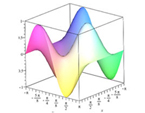
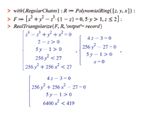
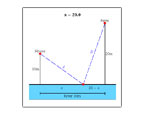
Here are the examples:


Figure 1: Symbolic and Numeric Math


Figure 2: Equation Solving


Figure 3: Differentitial Calculus


The advantages and disadvantages of using Maple:


ADVANTAGES
DISADVANTAGES
·         Very powerful language
·         Name convention are great
·         Many paradigm OOP/list/pattern mathing/logic programming
·         Ability of compile mode of some code
·         Very strong symbolic computation
·         Wolfram alpha is very good tool to dive in to world knowledge
·         Can be used to presentation because GUI is look like Notepad
·         Very good visualization library
·         Cost for extension
·         Long learning curve
·         Slow interpreter
·         It is hard to write the modular code
·         OOP is possible but is very unusable


Click here to download Maple software.